

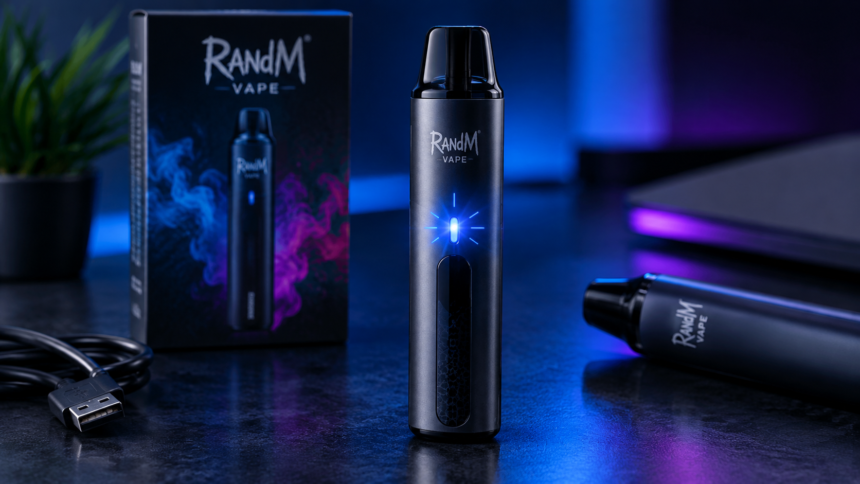
If your RandM vape is blinking, you may be wondering what the flashing light means and whether there is a problem with the device. A blinking indicator can happen for several reasons, including a low battery, charging status, an airflow issue, or a device fault.
The exact meaning of a blinking light depends on the specific RandM model because different devices can use different indicator patterns. However, understanding the most common causes can help you identify what is happening.
This guide explains why a RandM vape blinks, what different situations can mean, and what you can do when your device stops working normally.
Why Is My RandM Vape Blinking?
A blinking light usually indicates that the device has detected a particular condition. The most common reasons include:
- Low battery
- Charging status
- Automatic cut-off
- Airflow problems
- Connection issues
- Empty e-liquid
- Device malfunction
Because RandM has several models and product versions, the meaning of a particular blinking pattern can vary. Always check the instructions supplied with your specific device when available.
1. The Battery May Be Low
One of the most common reasons a RandM vape starts blinking is a low battery.
Rechargeable RandM Tornado devices typically use an indicator light to show battery status. When the battery becomes too low to operate the heating system properly, the device may flash instead of producing vapor.
If your model has a charging port and is designed to be rechargeable, connect it to the recommended charging equipment according to the manufacturer’s instructions.
Avoid using damaged charging cables or charging a device that appears swollen, cracked, or unusually hot.
2. Your RandM Vape May Be Charging
A blinking light doesn’t always mean there is a problem.
Some rechargeable vape models use a flashing or illuminated indicator while charging. Once the charging process is complete, the light may change or turn off.
The exact indicator behavior depends on the specific RandM model. Therefore, if the device is connected to a charger and appears to be functioning normally, check the manufacturer’s instructions to understand what the light pattern means.
3. The Device May Have an Automatic Cut-Off
Some vaping devices have a puff time limit designed to prevent excessively long activations.
If you take a very long draw, the device may stop heating and flash its indicator. This can be a normal safety feature rather than a malfunction.
If the device works again after waiting briefly and taking a shorter puff, the blinking may have been caused by the automatic cut-off.
4. There Could Be an Airflow Problem
RandM disposable-style vapes generally rely on airflow sensors to detect when the user takes a puff.
If the airflow path becomes blocked, the sensor may not operate correctly.
Dust, lint from clothing, condensation, or e-liquid around the mouthpiece can potentially interfere with airflow.
If you carry your RandM vape in your pocket, inspect the mouthpiece and airflow openings for visible debris. Do not insert sharp objects into the device because doing so could damage internal components.
5. The Vape May Be Empty
A blinking indicator can sometimes occur when the device has reached the end of its usable e-liquid supply.
If the device has been used frequently and you notice that the vapor has become weaker, the flavor has changed, or the device is no longer producing vapor, it may be nearing the end of its intended use.
A puff count printed on a product is generally an advertised estimate. Actual usage can vary depending on puff length, frequency, and other factors.
6. The Device Could Have a Connection Problem
For devices with removable pods, tanks, or other replaceable components, poor contact between components can sometimes cause flashing.
However, many RandM disposable-style products are designed as integrated devices and do not have user-removable components.
If your particular model contains removable parts, follow the manufacturer’s instructions rather than attempting to disassemble the device yourself.
7. The Vape May Be Damaged
Physical damage can also cause abnormal blinking.
Dropping a vape, crushing it in a bag or pocket, or exposing it to water can potentially damage its internal electronics.
Stop using the device if you notice:
- Cracks or severe physical damage
- Swelling
- Unusual heat
- A strong chemical smell
- Persistent leaking
- Sparks or smoke
Do not attempt to repair a damaged vape yourself.
What Should You Do When Your RandM Vape Blinks?
The first step is to identify when the blinking happens.
If It Blinks When You Take a Puff
Check whether the battery is low, the airflow is blocked, or the device has reached its automatic puff cut-off.
If It Blinks While Charging
Check the instructions for your specific RandM model. The flashing light may simply indicate that charging is in progress.
If It Blinks Continuously
If the device continues flashing and does not produce vapor, there may be a battery, sensor, electronics, or other internal problem.
Do not repeatedly try to activate a device that appears damaged or malfunctioning.
How to Prevent RandM Vape Problems
Proper handling can help reduce common problems.
Keep it away from extreme heat: Don’t leave your vape in direct sunlight or inside a hot vehicle.
Avoid water: Keep the device dry and away from liquids.
Don’t drop it: Physical impact can damage internal components.
Keep the mouthpiece clean: Remove visible dust or lint from the outside without inserting objects into the device.
Follow charging instructions: Use the charging method recommended for your specific model.
Store it safely: Keep vaping products away from children and pets.
Does Every RandM Vape Blink the Same Way?
No. Different RandM models may use different indicator systems.
A flashing light on one model may indicate low battery, while another model may use a similar light pattern for charging, puff cut-off, or another condition.
For this reason, there is no universal interpretation for every RandM blinking pattern. The product packaging, user manual, or manufacturer’s information for your exact model is the most reliable source.
Frequently Asked Questions
Why is my RandM vape blinking but not hitting?
A blinking RandM vape may have a low battery, airflow problem, automatic cut-off, empty e-liquid supply, or an internal fault. The exact cause depends on the model.
Why does my RandM vape blink when I puff?
The device may be detecting a low battery, airflow issue, puff-time limit, or another operating condition. Check the instructions for your particular model.
Can I fix a blinking RandM vape myself?
Simple issues such as charging a compatible rechargeable device or removing visible debris around the mouthpiece may be addressed according to the manufacturer’s instructions. Do not open or modify the device.
Why is my RandM vape blinking while charging?
On some rechargeable models, blinking may simply indicate that charging is taking place. Check the model-specific instructions for the exact indicator meaning.
What if my RandM vape keeps blinking?
If it continues blinking and does not work normally, stop using it and check the manufacturer’s guidance. If the device is damaged, unusually hot, swollen, leaking heavily, or showing other signs of failure, do not continue using it.
Final Thoughts
A blinking RandM vape does not automatically mean that the device is broken. The light may indicate a low battery, charging status, automatic cut-off, airflow problem, empty e-liquid supply, or another condition.
Because RandM produces different models, the meaning of a blinking light can vary from one device to another. The best approach is to identify the exact model and follow its manufacturer-provided instructions.
If a vape becomes damaged, excessively hot, swollen, or behaves abnormally, avoid using or modifying it. Nicotine-containing vaping products are addictive and are not risk-free, so people who do not currently use nicotine should avoid starting.